Preferred unit
One line of an otherwise SI sheet needs to come out in lbf, because that is
what the supplier's data sheet quotes. Pin a preferred unit. The stored
quantity is untouched. Only the chip changes. The pin is saved on that region
as preferred_unit, so it survives Evaluate All and travels with
the file.
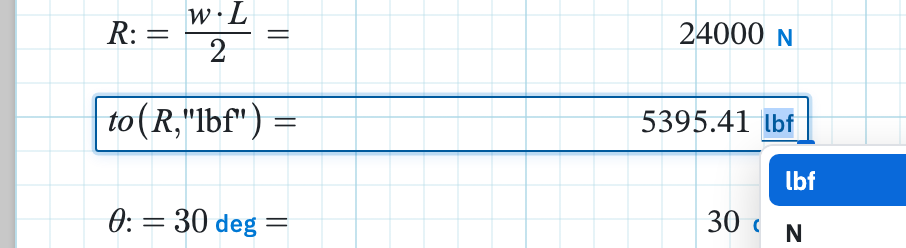
Pin a unit on the chip
- Evaluate the region so an answer chip appears. The expression needs a trailing
=. - Click the unit on the chip, the underlined token after the number. It reads Click to convert units.
- Pick a compatible unit from the list, or type one. Calculeaf converts the display and saves your choice. The chip takes on a pinned look and now reads Unit pinned — click to change or clear.
An incompatible token is rejected and the previous unit stays, so you cannot accidentally show a moment in metres. If you later edit the expression so the answer no longer has compatible units, the pin is dropped and the chip falls back to the evaluated unit.
Clearing a pin
Right-click the region and choose Reset units. The entry only appears when something is actually pinned, and with several regions selected it reads Reset units followed by the count and clears every pin in the selection at once. The chips then follow the worksheet unit system again. Opening the chip editor and clearing it, or typing back the unit the answer already evaluated to, has the same effect on a single region.
Pin or convert in the expression?
A pin is a display preference on one chip, invisible in the maths. When the
target unit is part of the calculation, the thing a checker should see,
write the conversion instead, with
to(quantity, "unit"):
R := w * L / 2 =
to(R, "lbf") =
That reads the same in a printed PDF and in anyone else's copy of the sheet, without depending on a pin somebody could clear.
When the unit list does not appear
The compatible-unit list on the chip comes from Autocomplete, so it needs Autocomplete in Home → Settings left on. With it off you can still pin a unit by typing a compatible one after you click the chip.
Next, conversion with to() when the unit belongs in the expression itself.