Autocomplete
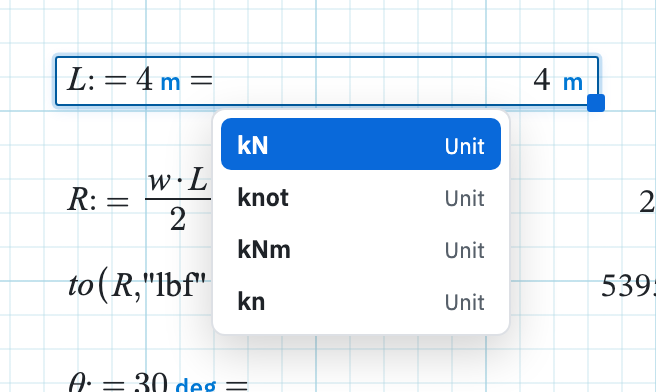
Type at the end of a math region and a list appears. It offers the worksheet
names and the unit tokens that match the letters so far. Each name shows its
current value beside it. That is how you check whether you called it
L_span or L_sp, and whether the token for a
megapascal is MPa or Mpa.
Turn it on or off
The Home tab has a Settings button in the
User group. It opens a modal with an Autocomplete
switch, which suggests matching units and existing variable names while you
type in math regions. It is on by default for new users. The status bar reports
Autocomplete on or Autocomplete off when
you toggle it. Turn it off if you find the popup distracting. Everything
still works, and you type the full token yourself. The same modal also has
Show := as =, which is off by default so assignment still
displays as :=.
What it suggests
- Variables already defined on this sheet, matched from the start of the name.
- Units from the catalogue. When the region already has an answer unit, unit suggestions stay within that dimension. Typing into a force answer offers other force units rather than metres.
One character is enough to open the list, and the list is capped at eight
rows. If what you have typed is itself an exact match, it is promoted to the
top so a longer token starting with the same letters cannot steal the
highlight. Type mm and you get mm, not mmHg.
Driving it from the keyboard
| Key | Effect |
|---|---|
| ↓ / ↑ | Move the highlight down and up the list. |
| Tab | Accept the highlighted suggestion. |
| Enter | Accept it too, unless the token you typed already matches exactly, in which case Enter does its usual job. |
| Esc | Dismiss the list and carry on typing. |
The same list on an answer
Clicking the unit on an answer chip opens a list of compatible units while Autocomplete is on. It draws on the same catalogue as the suggestions above, which is why switching Autocomplete off also removes that picker.
For the names it does not complete, see the function catalog and Greek letters and symbols. Unit suggestions come from the same catalogue described under units.