Greek letters and symbols
You need θ or σ. There are three ways to get it: click it on the Math tab,
type its English name, or hold Alt and press a letter. A Greek letter is an
ordinary name. σ can be a variable the same way s can.
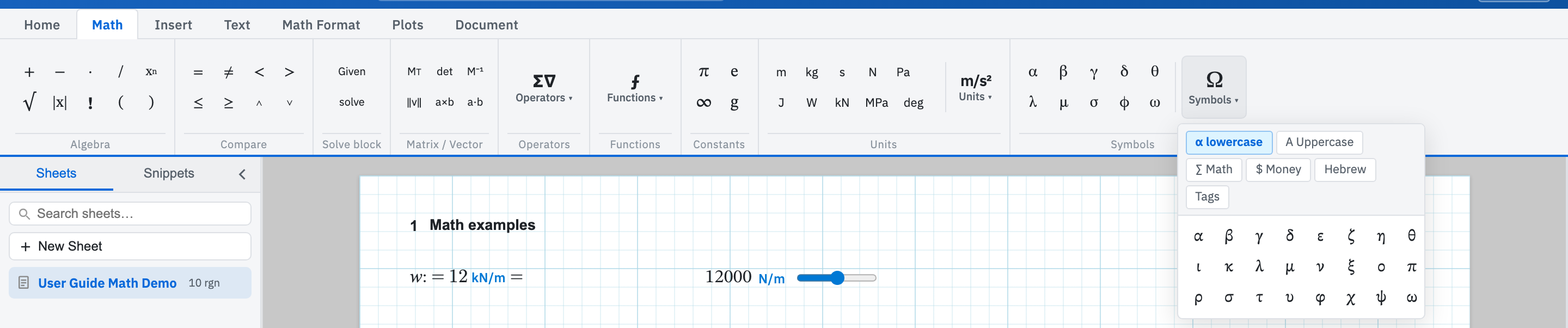
From the Math tab
The Symbols group puts α β γ δ θ λ μ σ φ ω one click away. Clicking one drops it into the math region that has focus, or opens a new region if nothing is focused. Symbols ▾ goes wider, with categories for α lowercase, Α Uppercase, ∑ Math, $ Money, Hebrew, and Tags.
Next along sits the Constants group: π,
e, ∞, and g, which is
standard gravity at 9.80665 m/s². Those four are values rather than plain
letters, so they arrive with a number attached. A := of your
own on any of those names still overwrites the built-in from that region
down.
Type the name
Type theta, sigma, or phi and the
field renders the letter as you finish the word. Capitalised names work the
same way: Delta gives Δ and Sigma gives Σ. Once
you know the name this beats opening a picker, and it keeps your hands where
they were.
Alt shortcuts
Hold Alt — Option on a Mac — and press a letter. Add Shift for the capital, so Alt+Shift+D gives Δ. The mapping follows the familiar Roman-to-Greek table, so the ten letters on the ribbon grid are:
| Shortcut | Letter | Shortcut | Letter |
|---|---|---|---|
| Alt+A | α | Alt+L | λ |
| Alt+B | β | Alt+M | μ |
| Alt+G | γ | Alt+S | σ |
| Alt+D | δ | Alt+F | φ |
| Alt+Q | θ | Alt+W | ω |
The rest of the alphabet follows suit. Alt+P for π, Alt+R for ρ, Alt+T for
τ, Alt+C for χ, Alt+E for ε, Alt+H for η, and so on. Only j,
o, and v are unmapped, having no natural Greek
counterpart.
Subscripts
An underscore after a name starts a subscript, so sigma_x
renders as σ with a subscript x. The order does not matter: insert the Greek
letter from the ribbon first and type _x after it if that is
quicker.
The complete Alt map lives on the keyboard shortcuts page. Note that autocomplete will not finish a Greek name for you. It handles variables and units only.