The Workspace
Look at the window. Four bands hold every control you will use.
Come back here when a later page says on the Document tab and you cannot find it.
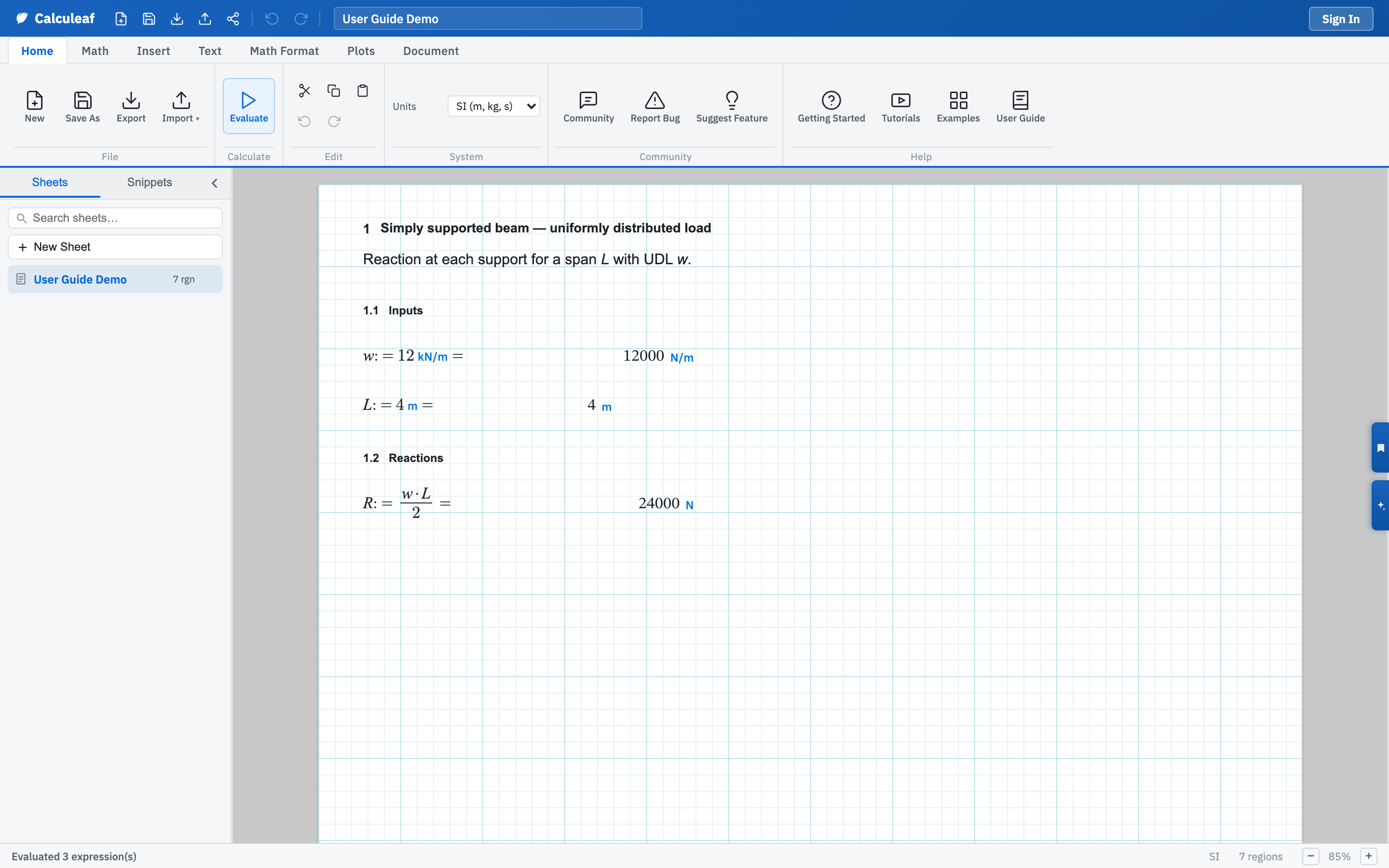
The four bands
The dark Quick Access bar sits at the top and never changes: New, Save As, Export, Import, Share, Undo, Redo, the sheet name, and your account. Evaluate is not on this bar. It lives on the Home tab.
Below that, the ribbon carries seven tabs of commands. An eighth, Review, appears when you are on a team and you own the sheet or are its reviewer. The left sidebar holds three panels: Sheets, Snippets, and Team. Switch them with the tabs in its header. Buttons on the right edge open the AI assistant and the Sections bookmarks. Along the bottom, the status bar reports the last action, the cursor position, the unit system, the region count, and the zoom percentage.
What belongs to the sheet, what belongs to you
Page theme, grid visibility, format lock, unit system, and the header and footer bands are stored on the worksheet. They travel with a shared or exported copy.
Zoom, sidebar width, and the ribbon tab you were last on are remembered for
you in this browser. They do not travel with the sheet. Autocomplete and
whether assignment displays as := or = live in
Home → Settings and follow you across worksheets.
The pages
- Ribbon tabs — which tab holds the command you are hunting for, and what Quick Access duplicates.
- Canvas, zoom, and grid — how a region lands where you clicked, and how to read the page at anything from 25% to 200%.
- Paper themes — can you work on a dark page, and does the theme follow the printed output?
- Lock format — how do you freeze the layout so only input boxes, sliders, and dropdowns can change?
- Sheets and folders — where your worksheets live, and how to start one from a template.
- Snippets — how to reuse a block of regions on a different sheet.
- Sections sidebar — how to jump around a calculation that runs to several pages.