Sliders
You want to see how an answer moves when one input changes. Attach a
slider to an assignment, drag it, and every region below updates. A slider
is always attached to an existing assignment. There is no blank slider block
on the Insert tab. Right-click a region whose expression reads
name := number unit and choose Add slider… from
the context menu.

Add a slider
- Write the numeric assignment you want to vary, for example
w := 12 kN/m =. - Right-click the region frame. Aim at the frame rather than deep inside the field, where the browser's own menu can appear instead.
- Choose Add slider….
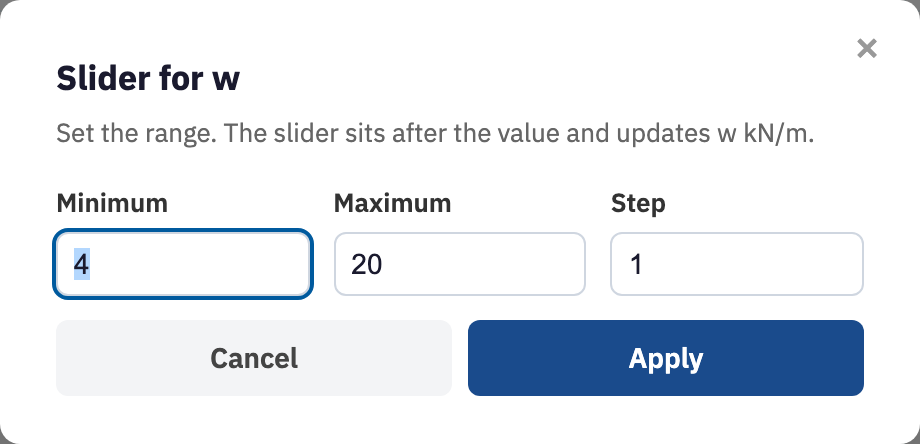
- In the Slider for w dialog, set Minimum, Maximum, and Step. The dialog rejects a non-numeric bound, a minimum equal to the maximum, and a step that is not positive.
- Choose Apply.
Drag the value
The range control appears after the number. Dragging rewrites the assignment
and re-evaluates the sheet. It is throttled slightly while the handle is
moving, then immediately when you let go. Names that depend on
w update in
evaluation order, so
anything above the slider is untouched and everything below follows. If what
you actually want is a handful of named cases rather than a continuous
sweep, a dropdown list is the better fit.
Edit or remove a slider
Right-click the region again for Edit slider…, which reopens the same dialog, or Remove slider. Removing it leaves whatever number the slider had reached sitting in the assignment. You can explore a range, settle on a value, and then tidy the control away before issuing the sheet.
Next, dropdown lists when you want named cases rather than a continuous sweep.